3.9. Communication With Devices Outside of PyMoDAQ
The preferred way of using a detector or an actuator with PyMoDAQ is of course to implement its instrument plugin, as explained in the plugin development page. However, in some cases, one already has working devices included in a program written in another langage. In this tutorial we present how it is possible to incoporate such a program in the PyMODAQ ecosystem. Working things will then be still used while benefiting all of PyMoDAQ’s advantages: extensions, saving, etc.
There are two different use cases: eiter your code is in python or it is not.
3.9.1. Python Devices Drivers Without PyMoDAQ Plugin
If you are already communicating with devices in python and that the effort to translate them into pymodaq plugins is too high (or time too short), you can easily connect them with the PymoDAQ ecosystem (even though it is really recommended to implement their instrument plugin).
To do that, you’ll have to install PyMoDAQ, this should install all PyMoDAQ packages and pyleco. You can then follow the example of the qt-less standalone to interface an actuator using your existing code with PyMoDAQ. Doing so results in a code similar to what you’ll get by writing a plugin, so once again it is advised to consider writing the plugin directly.
All of PyMoDAQ functionalities are available through this solution, except a local GUI for the device. The LECODirector will still provide a remote GUI functionality, see LECO communication for more details.
3.9.2. Drivers in Another Language
The most interesting case and recommended use-case is if there’s a part or all of your already existing setup implemented in another language, for example in LabView. It becomes interesting if you want to benefit from the PymoDAQ ecosystem and all the other existing instrument drivers/plugins.
You can then make your setup evolve without the hassle to extend your existing code but only rely on the PyMoDAQ community’s work!
As long as network capabilities are provided and a ZeroMQ library is available, it is possible to connect to PyMoDAQ through a minimal LECO implementation and control your devices from PyMoDAQ.
3.9.2.1. Functionalities
The drawback of this approach is that not all PyMoDAQ functionalities are supported.
For detectors, 0D, 1D and 2D are supported, as well as multichannel. ND should work but wasn’t tested.
For actuators, 0D, 1D and 2D are supported (even though the base GUI isn’t fully compatible with more than 0D). Multichannel (also called multiaxes) is not supported, but can be achieved by splitting a device by axe/channel and present them individually to PyMoDAQ.
In both cases, exchanging settings is not supported.
3.9.2.2. LECO Protocol
LECO is a generic communication protocol to control experiments and measurement hardware and is the mean of communicating with components outsides of PyMoDAQ. More detailed information can be found on the project page. This page will provide a basic explanation of LECO.
There are three essential and usefully LECO component interacting together in PyMoDAQ: - Coordinator: an external program in charge of handling routing messages between nodes, using registered names. It can be thought of as a switchboard operator when telephone companies employed them to let people speak to each other. - Director: a LECO entity that consume data and control actors. It is integrated in PyMoDAQ as the LECODirector family of plugins. It can be thought of as a movie director, asking actors to do something (control) and seeing their acting in return (consume). - Actor: part of you program that produce data. It is linked to the device. It can be thought of as a movie actor, acting like they’ve been told to (producing data).

Fig. 3.105 LECO Architecture
In Fig. 3.105 one can see the LECO network architecture. In this example, Node 1 and Node 2 are PyMoDAQ Dashboard instance, each with a set of Control/Instrument Modules corresponding to the devices (actors) connected. They are connected to the coordinator over the network, allowing the directors on the Main dashboard to send command to control them and retrieve their data.
3.9.2.2.1. JSON-RPC
LECO uses JSON-RPC to enable remote communication between distributed components. JSON-RPC is a way of achieving Remote Procedure Calls (RPC) using JSON to encode exchanged messages. It allows clients (Director) to call methods on a remote component (Actor) using standard JSON messages.
Example request:
{
  "jsonrpc": "2.0",
  "method": "sign_in",
  "params": null,
  "id": 1
}
Example response:
{
  "jsonrpc": "2.0",
  "result": null,
  "id": 1
}
However, in its integration with PyMoDAQ, pyleco can use supplementary binary data fields containing other types of data
all serialized as binary objects, with empty params and result fields in JSON requests and responses (as shown
on figure LECO Protocol Header and explained in Serialization).

Fig. 3.106 LECO Protocol Header
When communicating with components outside of PyMoDAQ, pure JSON is used, meaning that params and results
fields are used and the binary payload is left empty.
3.9.2.2.2. ZeroMQ (ZMQ)
ZMQ is a high-level messaging library that simplifies communication over the network. It was the chosen networking library for LECO. While it uses TCP under the hood, it hides the complexity of connection management and provides a more abstract, message-oriented interface.
Unlike TCP, which is low-level, synchronous, and requires manual handling of connections, ZeroMQ is asynchronous and handles connections, buffering, and reconnections automatically. It supports built-in communication patterns like request/reply or publish/subscribe, making it easier to build distributed systems with few networking code.
In short, ZMQ simplifies socket communication making it a more developer-friendly messaging layer.
LECO protocol uses ZMQ sockets. Each Director/Actor open one DEALER type socket to connect to the Coordinator,
that listens using a ROUTER type socket. This is why the external implementation should have a ZMQ library, like
LabView does.
3.9.2.3. Implementation Guide
To implement a plugin outside of PyMoDAQ, it is recommended to start by examining the mock examples. A good approach is to use state machines (like LabView) to decide which messages are accepted —triggering corresponding actions—, and which messages are declined —resulting in JSON-RPC error messages—, as this depends on the received message and the current state.

Fig. 3.107 State machine for exchanged LECO messages with an actuator

Fig. 3.108 State machine for exchanged LECO messages with a detector
Fig. 3.107 and Fig. 3.108 represent the state machines used in the
mock examples implementation. They graphically represent the transitions attribute and the
handle_trame method in the examples and represent valid transitions —or in other words the messages (RPC requests)
one can legally receive in a given state.
To understand a typical workflow and how the example code works, one can look at Fig. 3.109
and Fig. 3.110. They’re sequence diagrams of “classic” use-cases of an actuator and a
detector. In these diagrams links between Actor, Director and Coordinator are LECO trames containing a
JSON-RPC request or response sent through a ZMQ socket.
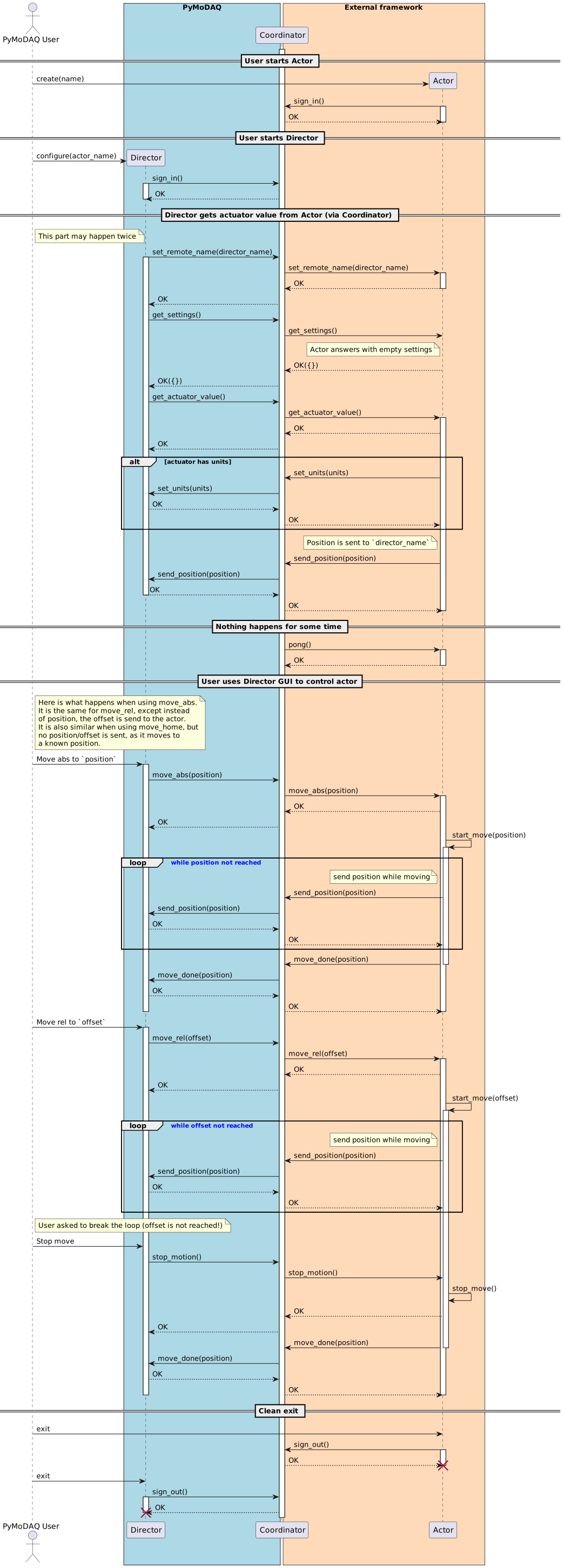
Fig. 3.109 Sequence diagram for exchanged LECO messages with an actuator
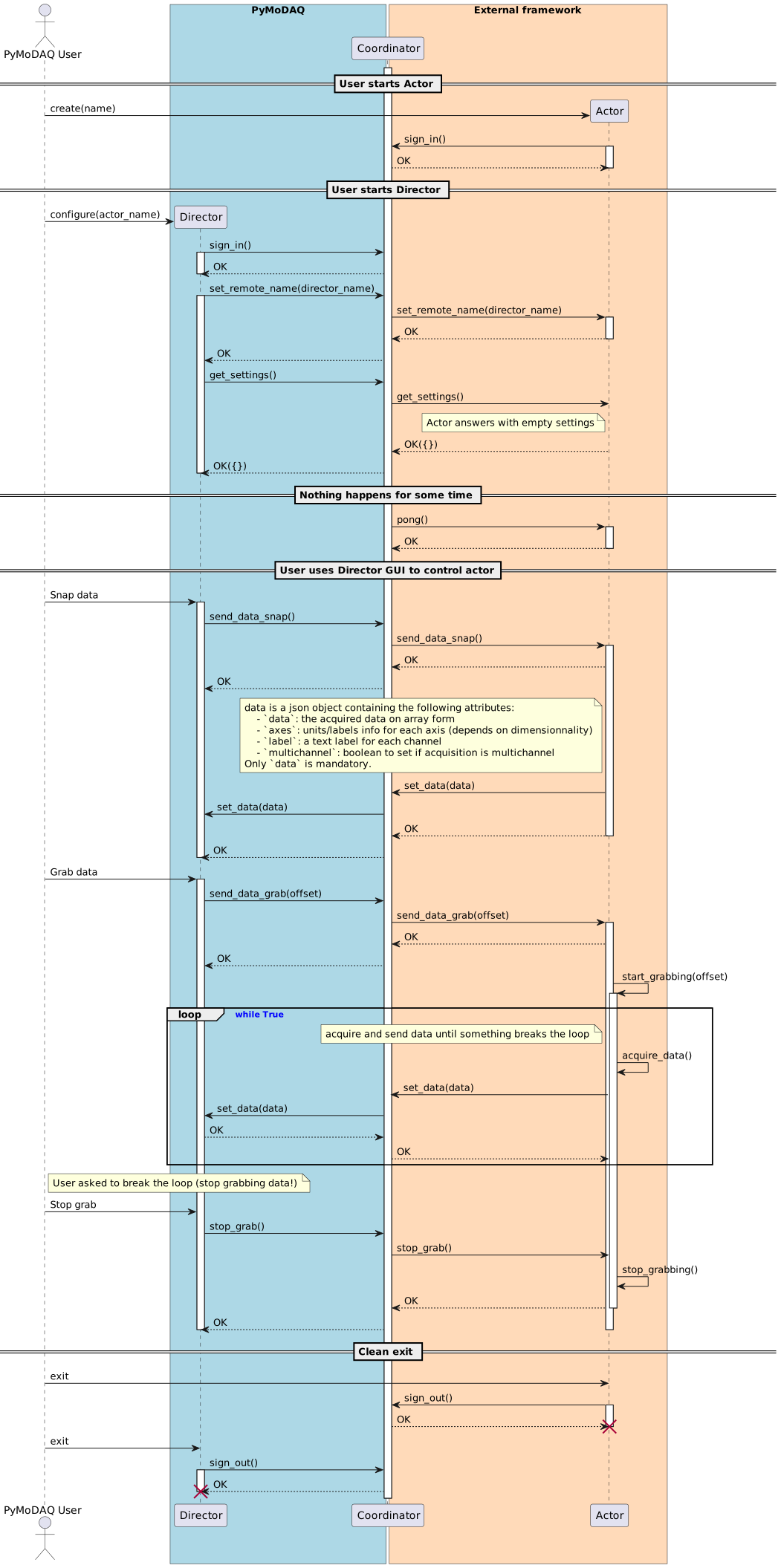
Fig. 3.110 Sequence diagram for exchanged LECO messages with a detector
Using these diagrams to understand the mock examples code and the state machines to list all possibilities, it
should be relatively easy to port for your setup. Once completed, please consider sharing your adaptation layer on
GitHub, as once done for a language, it is universal.
3.9.2.4. Compatibility
We tested the communication by porting examples to Python 3.4 on a Linux machine. It should be compatible down to
Windows XP, as long as one succeeds installing an old pyzmq version compatible with Python 3.4,
such as version 17 (good luck though!).
This means one could port their legacy setups to PyMoDAQ by writing the JSON-RPC communication layer and using an up-to-date machine to control the setup using PyMoDAQ with most of its functionality available.
Here is a list of exchanged messages.
3.9.2.5. Network API Message Reference
All communication uses LECO multipart frames over ZMQ using a DEALER type socket:
[ version, receiver, sender, LECO header, payload ]version: 1 byte (alwaysb"\x00")receiver: UTF-8 string (e.g."COORDINATOR")sender: UTF-8 string (device name)LECO header: 20 bytes =conversation_id(16B) +message_id(3B) +message_type(1B) -conversation_idcan be randomly generated and should be the same for a conversation (a sequence of requests/responses) but can be changed between each next request if wanted. -message_idgeneraly starts at 0, but must stay the same between a request and its answer. -message_typeis always JSON (value of1)Note
This specification is subject to change; please keep up to date with the LECO documentation and its GitHub repository.
payload: UTF-8 JSON (JSON-RPC 2.0)
Note
In the following message examples, given
idvalues are not specific to themethod, the must remain the same between a method and its result, but could be any valid integer value.
Unless specified otherwise, a reponse is always sent to the sender of the request. Also, with asynchronous requests,
the receiver (probably a LECODirector) will always respond the asynchronous requests, either with empty responses or
with error messages. It is up to the developper to take them into consideration.
Here is a recap of JSON-RPC payload structure:
Request:
{
  "id": <int>,
  "jsonrpc": "2.0",
  "method": "<name>",
  "params": { ... }
}
Tip
When an entry value is not set, such as params in sign_in messages, it can either be left empty ({}),
explicitly set to null or omitted.
Expected Response:
{
  "id": <same>,
  "jsonrpc": "2.0",
  "result": <any|null>
}
Error:
{
  "id": null,
  "jsonrpc": "2.0",
  "error": { "code": <int>, "message": "<str>" }
}
3.9.2.5.1. Message Summary
Common Messages
Method |
Description |
Flow |
|---|---|---|
Registers a LECO component with the coordinator. |
Actor → Coordinator |
|
Unregister a LECO component with the coordinator. |
Actor → Coordinator |
|
Store the director name for asynchronous communication. |
Director → Actor |
|
Request instrument settings (read/write) from LECODirector. |
Director → Actor |
|
Check if a LECO component is alive. |
Coordinator/Director → Actor |
|
Not implemented; calling it returns an error. |
Director → Actor |
Actuator Messages (Synchronous)
Method |
Description |
Flow |
|---|---|---|
Move actuator to home setpoint; async updates via send_position/set_move_done. |
Director → Actor |
|
Move actuator to absolute position; async updates as above. |
Director → Actor |
|
Move actuator by relative delta; async updates as above. |
Director → Actor |
|
Stop any ongoing movement immediately. |
Director → Actor |
|
Request current actuator value; async updates include set_units and send_position. |
Director → Actor |
Actuator Messages (Asynchronous)
Method |
Description |
Flow |
|---|---|---|
Send the current actuator position. |
Actor → Director |
|
Indicates the end of a move by providing the final position. |
Actor → Director |
|
Send units used by the actuator. |
Actor → Director |
Detector Messages (Synchronous)
Method |
Description |
Flow |
|---|---|---|
Ask data from detector repeatedly until stop_grab. |
Director → Actor |
|
Ask data from detector once. |
Director → Actor |
|
Stop detector acquisition. |
Director → Actor |
Detector Messages (Asynchronous)
Method |
Description |
Flow |
|---|---|---|
Send acquired data with optional multichannel, labels and axes metadata. |
Actor → Director |
Error Messages
Error message returned when request is invalid in current state. |
3.9.2.5.2. Common Messages
These are the messages used in both actuator and detector communication.
- sign_in
- Communication flow: Actor → Coordinator
Registers a LECO component with the coordinator. It is sent to receiver="COORDINATOR". It sends the sign_in request and receive either a valid response or an error
when the name is already taken. The coordinator retrieves the name from sender in the LECO protocol header.
Request:
{
  "id": 1,
  "jsonrpc": "2.0",
  "method": "sign_in",
  "params": {}
}
Expected Response:
{
  "id": 1,
  "jsonrpc": "2.0",
  "result": null
}
Error:
{
  "id": null,
  "jsonrpc": "2.0",
  "error": {
    "code": -32091,
    "message": "The name is already taken."
  }
}
- sign_out
- Communication flow: Actor → Coordinator
Unregister a LECO component with the coordinator. It is crucial to try as much as possible to send the message as it will otherwise keep the name unusable for at least a few minutes.
Request:
{
  "id": 2,
  "jsonrpc": "2.0",
  "method": "sign_out",
  "params": {}
}
Expected Response:
{
  "id": 2,
  "jsonrpc": "2.0",
  "result": null
}
- set_remote_name
- Communication flow: Director → Actor
Most instrument data shared between LECO components is shared asynchronously, thus an actor will need to initiate
communication with a director. Using this method, an actor stores the name of the director to which it should
send requests in the future. The stored name is the one in sender in the LECO protocol header.
Request:
{
  "id": 3,
  "jsonrpc": "2.0",
  "method": "set_remote_name",
  "params": {"name": "<remote>"}
}
Expected Response:
{
  "id": 3,
  "jsonrpc": "2.0",
  "result": null
}
- get_settings
- Communication flow: Director → Actor
Ask for the instrument settings, so that they can be accessed (read/write) by the LECODirector. The easiest is to send an empty JSON object, as settings are expected to use binary serialization. Doing so makes it impossible to access the settings on the Director side. It’s a known limitation of communication with non PyMoDAQ components.
Request:
{
  "id": 4,
  "jsonrpc": "2.0",
  "method": "get_settings",
  "params": {}
}
Expected Response:
{
  "id": 4,
  "jsonrpc": "2.0",
  "result": {}
}
- pong
- Communication flow: Coordinator/Director → Actor
A method sent by the coordinator to check if a LECO component is still alive, after a moment of inactivity. It is also sent periodically by the director.
Request:
{
  "id": 5,
  "jsonrpc": "2.0",
  "method": "pong",
  "params": {}
}
Expected Response:
{
  "id": 5,
  "jsonrpc": "2.0",
  "result": null
}
- rpc.discover
- Communication flow: Director → Actor
Not implemented and it should not even be called. Response can be an error:
{
  "id": null,
  "jsonrpc": "2.0",
  "error": {
    "code": -1,
    "message": "NotImplemented"
  }
}
3.9.2.5.3. Actuator Messages (Synchronous)
Messages only used when communicating with an actuator. These are the requests made by the Director and correspond to a possible action of a DAQ_Move GUI.
- move_home
- Communication flow: Director → Actor
A request to move_home, i.e. to move to a setpoint value. A first request is sent, followed by the reponse. In the
background, a request to move is sent to the actuator. Until the target value is reached (or a stop_move is
received), the actuator is probed and its value is periodically sent to the remote name stored after
set_remote_name using the send_position request. Once done moving, the final value is sent with
set_move_done.
Request:
{
  "id": 6,
  "jsonrpc": "2.0",
  "method": "move_home",
  "params": {}
}
Expected Response:
{
  "id": 6,
  "jsonrpc": "2.0",
  "result": null
}
Async actuator-initiated messages:
Sequence of send_position, then set_move_done
- move_abs
- Communication flow: Director → Actor
Similar to move_home, except that an absolute value to reach is sent in the first request.
Request:
{
  "id": 7,
  "jsonrpc": "2.0",
  "method": "move_abs",
  "params": {"position": <number|1D array|2D array>}
}
Expected Response:
{
  "id": 7,
  "jsonrpc": "2.0",
  "result": null
}
Async actuator-initiated messages:
Sequence of send_position, then set_move_done
- move_rel
- Communication flow: Director → Actor
Similar to move_home, except that a delta from the value to reach is sent in the first request.
Request:
{
  "id": 8,
  "jsonrpc": "2.0",
  "method": "move_rel",
  "params": {"position": <number|1D array|2D array>}
}
Expected Response:
{
  "id": 8,
  "jsonrpc": "2.0",
  "result": null
}
Async actuator-initiated messages:
Sequence of send_position, then set_move_done
- stop_motion
- Communication flow: Director → Actor
A request to stop a move_* action if one is occuring. The movement should be stopped before sending the response.
Request:
{
  "id": 9,
  "jsonrpc": "2.0",
  "method": "stop_motion",
  "params": {}
}
Expected Response:
{
  "id": 9,
  "jsonrpc": "2.0",
  "result": null
}
- get_actuator_value
- Communication flow: Director → Actor
A request to ask for the current value. First the response is sent. Then, the actuator is probed and its units are sent
(if it uses units) as a parameter of set_units. Finally, its value is sent with send_position.
Request:
{
  "id": 10,
  "jsonrpc": "2.0",
  "method": "get_actuator_value",
  "params": {}
}
Expected Response:
{
  "id": 10,
  "jsonrpc": "2.0",
  "result": null
}
Async actuator-initiated messages:
An optional set_unit followed by send_position
3.9.2.5.4. Actuator Messages (Asynchronous)
Messages only used when communicating with an actuator. These are asynchronous responses (in the form of JSON-RPC
requests) made by the Actor, in response of synchronous requests.
They are sent to the receiver saved after processing set_remote_name.
- send_position
- Communication flow: Actor → Director
Send the current position to the Director. It is either a number, a 1D array or a 2D array.
A 2D actuator could be, for example a Spatial Light Modulator, where each pixel is controled and correspond to a phase.
Warning
Actuator values are mostly 0D and if PyMoDAQ’s daq_move GUI is used, they should be 0D. However, if used programmatically, to build extensions or other virtual devices, exchanging 0D, 1D, and 2D actuator values is allowed.
Request:
{
  "id": 10,
  "jsonrpc": "2.0",
  "method": "send_position",
  "params": {"data": {"position": <number|1D array|2D array>}}
}
Expected Response:
{
  "id": 10,
  "jsonrpc": "2.0",
  "result": null
}
Examples:
On a 2x2 SLM, to send the normalized phases [[0,1/2], [1/3, 2/3]], params should be set to:
{
  "data" : {
    "position": [[0, 0.5], [0.3333333333333333, 0.6666666666666666]]
  }
}
- set_move_done
- Communication flow: Actor → Director
After a move_* command is completed or stopped, a set_move_done with the final position is sent to the Director.
The position is of the same shape as in py:attr:send_position.
Request:
{
  "id": 11,
  "jsonrpc": "2.0",
  "method": "set_move_done",
  "params": {"data": {"position": <number|1D array|2D array>}}
}
Expected Reponse:
{
  "id": 11,
  "jsonrpc": "2.0",
  "result": null
}
- set_units
- Communication flow: Actor → Director
An optional message, to set units used by the actuator. The units should be a string of the unit symbol of
the used units. For example “cm” for centimeters.
Request:
{
  "id": 12,
  "jsonrpc": "2.0",
  "method": "set_units",
  "params": {"units": "<str>"}
}
Expected Response:
{
  "id": 12,
  "jsonrpc": "2.0",
  "result": null
}
3.9.2.5.5. Detector Messages (Synchronous)
Messages only used when communicating with a actuator. These are the requests made by the Director and correspond to a possible action of a DAQ_Viewer GUI.
- send_data_grab
- Communication flow: Director → Actor
Ask data from a detector. First the actor should send its response. Then in background, using
the remote name stored after set_remote_name, set_data requests are sent periodically, with data as a
parameter.
It continues until a stop_grab request is received.
Request:
{
  "id": 13,
  "jsonrpc": "2.0",
  "method": "send_data_grab",
  "params": {}
}
Expected Response:
{
  "id": 13,
  "jsonrpc": "2.0",
  "result": null
}
Async detector-initiated messages:
Sequence of set_data until a stop_grab is received.
- send_data_snap
- Communication flow: Director → Actor
Same as send_data_grab but only once.
Request:
{
  "id": 14,
  "jsonrpc": "2.0",
  "method": "send_data_snap",
  "params": {}
}
Expected Response:
{
  "id": 14,
  "jsonrpc": "2.0",
  "result": null
}
Async detector-initiated messages:
One set_data request.
- stop_grab
- Communication flow: Director → Actor
The request sent when the acquisition should stop. The detector should stop acquiring and send data before answering to this request.
Request:
{
  "id": 15,
  "jsonrpc": "2.0",
  "method": "stop_grab",
  "params": {}
}
Expected Response:
{
  "id": 15,
  "jsonrpc": "2.0",
  "result": null
}
3.9.2.5.6. Detector Messages (Asynchronous)
Messages only used when communicating with an detector. These are asynchronous responses (in the form of JSON-RPC
requests) made by the Actor, in response of synchronous requests.
They are sent to the receiver saved after processing set_remote_name.
- set_data
- Communication flow: Actor → Director
Send acquired data to the Director, in the form of <RawDetectorData> and some optional metadata about axes,
and multichannel
<RawDetectorData> is a number, a 1D array or 2D data array of number. When using multichannel, it gets wrapped in
another layer of array corresponding the channels. So [<RawDetectorData>, <RawDetectorData>] for two channels,
where each <RawDetectorData> is of a shape matching the expected detector dimension.
Warning
ND data should also work but was not tested!
Request:
{
  "id": 16,
  "jsonrpc": "2.0",
  "method": "set_data",
  "params": {
    "data": {
      "data": <RawDetectorData>,
      "axes": [ {"data":[...], "units":"...", "label":"..."} ], # Optional
      "labels": ["ch0", ...], # Optional
      "multichannel": <bool> # Optional if false
    }
  }
}
Expected Response:
{
  "id": 16,
  "jsonrpc": "2.0",
  "result": null
}
Examples:
The simplest form for <RawDetectorData> is 0D without any metadata, so it would look like:
{
  "data": {
    "data": 131.20,
  }
}
But it can be more complex, for example 1D detector may send data with an axis:
Note
Axes work similarly to those in PyMoDAQ data, except that index is only determined by its position in the array (it can not be affected dynamically). The first axis correspond to the outermost dimension of data, the second axis to the second to last dimension, and so on.
{
  "data": {
    "axes": [
      {
        "data": [ 0.0, 0.92, 2.20, 4.0],
        "label": "shift",
        "units": "cm"
      }
    ], # Each element in an axis (data, label, units) is optional
    "data": [42.15, 48.68, 24.45, 35.38],
    "labels": null,
  }
}
If the detector is multichannel it may be useful to label each channel:
{
  "data": {
    "axes": [
      {
        "data": [ 0.0, 0.92, 2.20, 4.0]
        "label": "shift",
        "units": "cm"
      }
    ], # Each element in an axis (data, label, units) is optional
    "data": [
        [-42.15, 48.68, -24.45, -35.38],
        [ 0.0, 0.1, 0.05, 0.06]
    ]
    "labels": ["x shift", "y shift"],
    "multichannel": true # Mandatory, otherwise data is interpreted as 2D
  }
}
3.9.2.5.7. Error Messages
- invalid_request
When a request is not supposed to be received in the current state according to Fig. 3.107 and Fig. 3.108, one should still answer but with an error:
{
  "id": null,
  "jsonrpc": "2.0",
  "error": {
    "code": -100,
    "message": "Request received is invalid in current state."
  }
}
Note
message and code values are user-defined.