PyMoDAQ Logo

Supported instruments

  • Supported instruments

Documentation

  • 1. Quick Start
  • 2. User’s Guide
    • 2.1. Tips/Issues for installation
    • 2.2. DashBoard and Control Modules
    • 2.3. Dashboard Extensions
      • 2.3.1. DAQ Scan
        • 2.3.1.1. Introduction
        • 2.3.1.2. Main Control Window
        • 2.3.1.3. Scan Flow
        • 2.3.1.4. Various settings
        • 2.3.1.5. Scanner
        • 2.3.1.6. Navigator
        • 2.3.1.7. Scan Batch Manager
      • 2.3.2. DAQ Logger
      • 2.3.3. PID Module
      • 2.3.4. Bayesian Optimisation
      • 2.3.5. Adaptive Scanning
      • 2.3.6. DataMixer
      • 2.3.7. Console
    • 2.4. Configuration
    • 2.5. Useful Modules
    • 2.6. TCP/IP communication
    • 2.7. LECO communication
    • 2.8. Plugin Manager
    • 2.9. Environment backups
  • 3. Tutorials
  • 4. Lab Stories
  • 5. Data Management
  • 6. Developer’s Guide
  • 7. Glossary Terms
  • 8. Library Reference
  • 9. About

Related projects

  • PyMoDAQ Femto
  • PyMoDAQ Plugins DAQmx
PyMoDAQ
  • 2. User’s Guide
  • 2.3. Dashboard Extensions
  • 2.3.1. DAQ Scan
  • 2.3.1.6. Navigator
  • View page source

2.3.1.6. Navigator

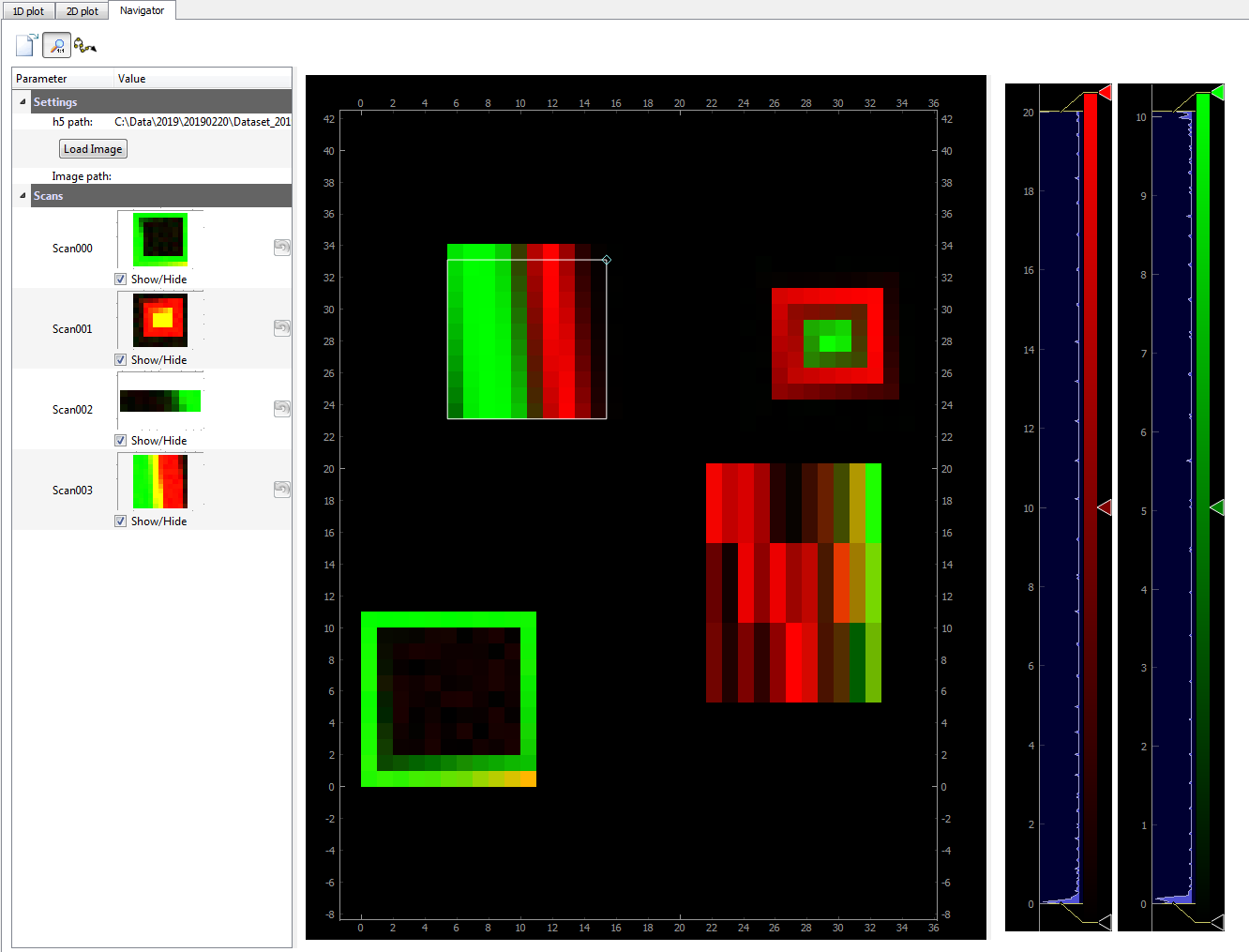
From version 1.4.0, a new module has been added: the Navigator (daq_utils.plotting.navigator). It is most useful when dealing with 2D scans such as XY cartography. As such, it is not displayed by default. It consists of a tree like structure displaying all currently saved 2D scans (in the current dataset) and a viewer where selected scans can be displayed at their respective locations. It can be displayed using the Settings menu, Show Navigator option. Fig. 2.36 shows the DAQ_scan extension with activated Navigator and a few scans. This navigator can also be used as a Scan Selector viewer to quickly explore and select areas to scan on a 2D phase space.
navigator

Fig. 2.36 An example of dataset displaying several 2D scans at their respective locations (up and right axis)

Previous Next

© Copyright 2026, Weber Sébastien.

Built with Sphinx using a theme provided by Read the Docs.