3.6.8. A simple absorption spectrometer
The goal of this chapter is to turn the bare spectro-photometer into an absorption spectrometer. It should have three working modes, display raw detector data, display background subtracted detector data and display absorption. A full absorption measurement needs the determination of the detector’s dark signal, to be subtracted from each acquisition, and a reference of the incident light. The corresponding workflow is
Determine the dark using the corresponding shutter.
Let the user insert a sample with pure solvent.
Perform the absorption measurement on a real sample.
Since the noise on the background and the reference data enter into each subsequent absorption measurement, it can be of advantage to accumulate these data with a larger number of samples. Therefore, an additional averaging parameter is introduced for each of these measurements.
 class Absorption(CustomExt):

     measurement_modes = [ 'Raw', 'Background Subtracted', 'Absorption' ]
     ...
     application_params = [
         {'name': 'measurement_mode', 'title': 'Measurement Mode',
          'type': 'list', 'limits': measurement_modes,
          'tip': 'Measurement Mode', 'value': measurement_modes[0] },
         {'name': 'back_averaging', 'title': 'Background Averaging',
          'type': 'int', 'min': 1, 'max': 1000, 'value': 100,
          'tip': 'Background Software Averaging'},
         {'name': 'ref_averaging', 'title': 'Reference Averaging',
          'type': 'int', 'min': 1, 'max': 1000, 'value': 100,
          'tip': 'Reference Software Averaging'},
     ]
     ...
     params = application_params + [
     ...
To make the values of these settings persistent, their storage has to be updated as well
     def read_settings(self, qt_settings):
         ...
         for param in self.application_params:
             self.settings[param['name']] = \
                 qt_settings.value(param['name'], param['value'])

     def write_settings(self, qt_settings):
         ...
         for param in self.application_params:
             qt_settings.setValue(param['name'], self.settings[param['name']])
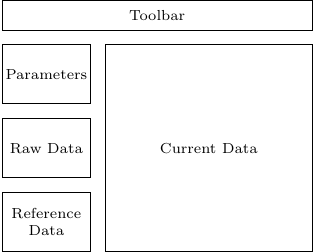
The GUI has also to be updated. It is always a good idea to display all data entering into the final result in some fashion. A simple mockup of the GUI of our extension shows the general idea.
 def setup_docks_and_widgets(self):
     ...
     self.spectrum_label = DockLabel("Current Data")
     ...
     raw_data_dock = gutils.Dock('Raw Data')
     self.docks['raw-data'] = \
         self.dockarea.addDock(raw_data_dock, "bottom",
                               self.docks['settings'])
     raw_data_widget = QtWidgets.QWidget()
     self.raw_data_viewer = Viewer1D(raw_data_widget)
     self.raw_data_viewer.toolbar.hide()

     raw_data_dock.addWidget(raw_data_widget)

     background_dock = gutils.Dock('Background')
     self.docks['background'] = \
         self.dockarea.addDock(background_dock, "bottom",
                               self.docks['raw-data'])
     background_widget = QtWidgets.QWidget()
     self.background_viewer = Viewer1D(background_widget)
     background_dock.addWidget(background_widget)
     self.background_viewer.toolbar.hide()
Two new actions are needed
 class Absorption(CustomExt):
 ...
     def setup_actions(self):
         self.add_action('acquire', 'Acquire', 'run2',
                         "Acquire", checkable=False, toolbar=self.toolbar)
         self.add_action('stop', 'Stop', 'stop2',
                         "Stop", checkable=False, toolbar=self.toolbar)
         self.add_action('background', 'Take Background', 'brightness_3',
                         "Take Background", checkable=False,
                         toolbar=self.toolbar)
         self.add_action('reference', 'Take Reference', 'lightbulb',
                         "Take Reference", checkable=False,
                         toolbar=self.toolbar)
         self._actions["stop"].setEnabled(False)
After deleting again the GUI settings file, the extension should now look like
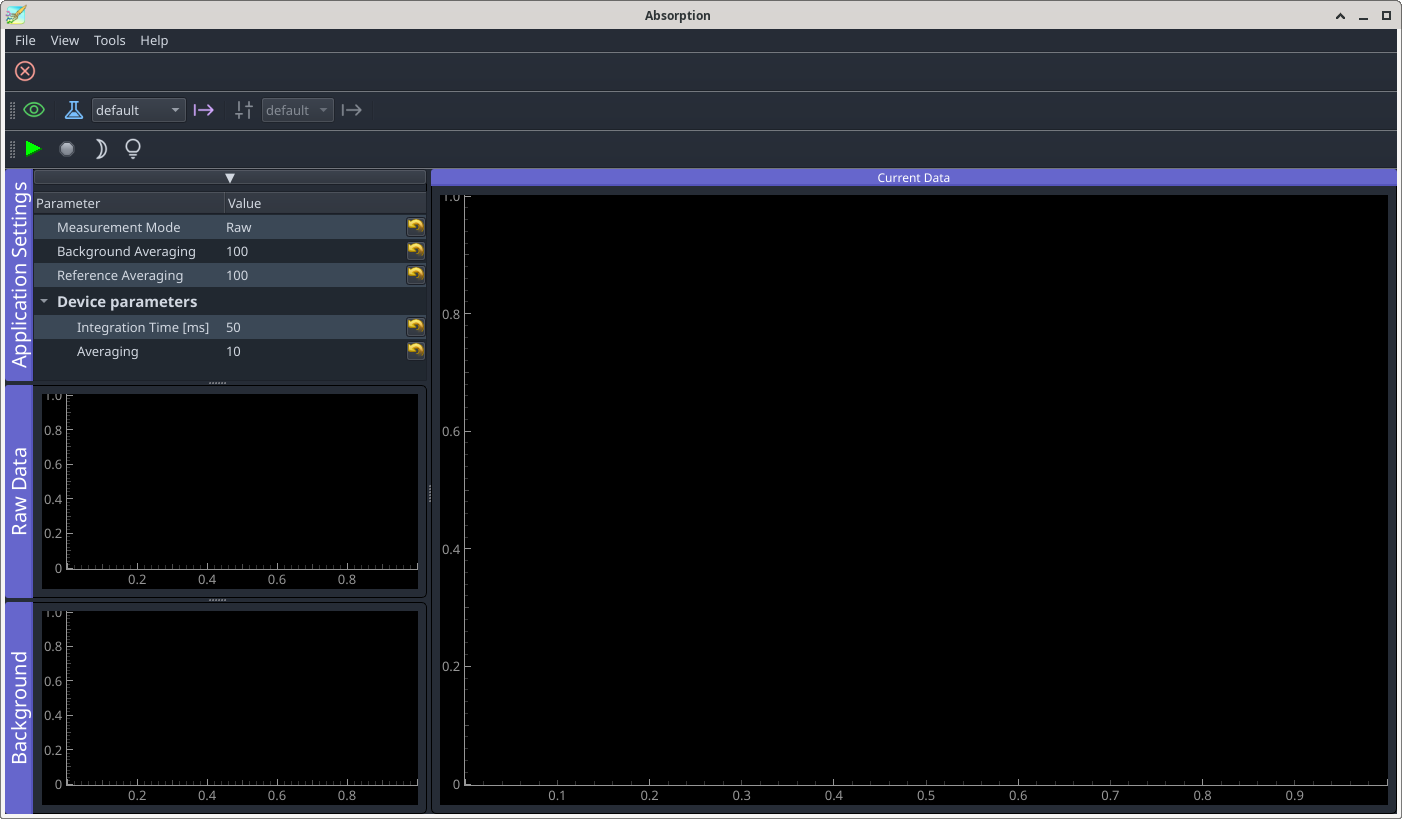
If you need icons which are not present in the icon library (pymodaq_gui/resources/icon_library), you’ll have to select suitable ones at https://fonts.google.com/icons. To be able to add them to PyMoDAQ’s icon library you have to fork the PyMoDAQ repository, add the icons’ names to the list in pymodaq_gui/resources/icons.toml and follow the instructions therein and in pymodaq_gui/resources/check_icons_dev.py. After a pull request, the additional icons will be available to all PyMoDAQ users. During development it is sufficient to install the pymodaq_gui package in editable mode within your working environment and apply these changes there.
-> branch updated-gui
The newly defined actions do not yet trigger any real operations. However, we should prepare some book keeping to prevent exceptions being raised due to missing properties. In the ‘Raw’ mode, neither background nor reference data are needed. Both new actions should therefore be disabled in that mode. On the other hand, when selecting ‘Background Subtracted’, a measurement is not possible until the background has been recorded. Likewise, an absorption measurement is possible only once both background and reference have been determined. The following routine takes care of the corresponding activation and deactivation operations.
class Absorption(CustomExt):
...
    def adjust_actions(self):

        action_states = {
            'Raw': [True, False, False],
            'Background Subtracted': [self.have_background, True, False],
            'Absorption': [ self.have_reference, True, self.have_background],
            'Busy': [False, False, False]
            }

        is_idle = self.acquisition_mode == 'idle'
        mode = self.settings['measurement_mode'] if is_idle else 'Busy'

        self.docks['settings'].setEnabled(is_idle)
        self._actions["stop"].setEnabled(not is_idle)
        for name,state in zip(["acquire", "background", "reference"],
                              action_states[mode]):
            self._actions[name].setEnabled(state)
To make this work, we need to declare the flags at initialisation and to call this method whenever the measurement mode or the state of the flags has changed. Some other parameter changes may equally call for an update of the actions. E.g. the background signal depends on the integration time. When the latter is changed we have to invalidate the former. We also have to distinguish between normal acquisition and acquisition of background and reference data. Furthermore, while the shutter is moving or we wait for the user to exchange samples, any incoming data should be discarded.
 class Absorption(CustomExt):
 ...
     def __init__(self, parent: gutils.DockArea, dashboard):
         self.detector: DAQ_Viewer = None
         super().__init__(parent, dashboard)
         self.have_background = False
         self.have_reference = False
         self.acquisition_mode = 'idle'
         self.data_valid = False
         self.setup_ui()
         ...

     def value_changed(self, param):
         if param.name() == "integration_time":
             ...
             if self.settings['measurement_mode'] != 'Raw':
                 self.detector.stop()
             self.have_background = False
             self.have_reference = False
         self.adjust_actions()

     def start_acquiring(self):
         ...
         self._actions["stop"].setEnabled(True)
         self.acquisition_mode = 'acquire'
         self.adjust_actions()
         self.detector.grab()

     def stop_acquiring(self):
         self.detector.stop_grab()
         self.acquisition_mode = 'idle'
         self.adjust_actions()
         ...
Adjusting the actions may not be necessary each time some parameter has changed. However, it is safer just to do so. Data coming in from the plugin have now to be handled in different ways depending on the acquisition mode.
 class Absorption(CustomExt):
 ...
     def take_data(self, data: DataToExport):
         ...
         self.n_samples = 0

         if self.settings['measurement_mode'] == 'Raw':
             self.show_data(self.mean_current, self.error_current, 'raw')
             return

         if self.acquisition_mode == 'acquire':
             self.take_normal(self.mean_current, self.error_current)
         else:
             self.data_valid = False
             self.detector.stop_grab()
             am = self.acquisition_mode
             self.acquisition_mode = 'idle'
             if am == 'background':
                 self.take_background(self.mean_current, self.error_current)
             else:
                 self.take_reference(self.mean_current, self.error_current)

         # remove the remaining rest of the method
Spectral regions where the level of the white light lamp is low may induce problems. In such regions one may obtain negative signals through fluctuations of the background and in consequence, the logarithm is not defined any more. To avoid NaN values which may screw up the graphical display, a mask of validity is kept together with the reference signal.
class Absorption(CustomExt):
...
    def take_normal(self, mean, error):
        self.mean_signal = mean - self.background

        if self.settings['measurement_mode'] == 'Background Subtracted':
            self.error_signal = np.sqrt(error**2 + self.error_background**2)
            self.show_data(self.mean_signal, error, 'signal', self.mean_signal)
        else: # self.settings['measurement_mode'] == ABSORPTION:
            valid_mask = \
                np.logical_and(self.mean_signal > 0, self.reference_valid_mask)
            self.absorption = \
                np.where(valid_mask,
                         -np.log10(self.mean_signal / self.reference), 0)
            self.error_absorption = \
                1 / np.log(10) \
                * np.sqrt((error / self.mean_signal)**2
                          + ((self.error_reference + self.error_background)
                             / self.reference)**2
                          + (1 / self.mean_signal - 1 / self.reference)**2
                            * self.error_background)

            self.show_data(self.absorption, self.error_absorption, 'absorption',
                           self.mean_signal, self.reference)

    def take_background(self, mean, error):
        self.background = mean
        self.error_background = error
        self.have_background = True
        self.have_reference = False
        dfp = DataFromPlugins(name='Spectrograph',
                              data=[self.background, self.error_background],
                              dim='Data1D', labels=['background', 'error'],
                              axes=[self.x_axis])
        self.spectrum_viewer.show_data(dfp)
        self.background_viewer.show_data(dfp)
        self.dark_shutter.move_abs(1200)
Recording the reference in the simulated environment needs a little tweak. With the real machine, the user exchanges the sample with a pure solvent cell. In the present simulation this has to be done by software. To this end we set the controller’s property with_sample. In case of a real-world device, that added but unused property won’t do any harm.
class Absorption(CustomExt):
...
    def take_reference(self, mean, error):
        self.reference = mean - self.background
        self.error_reference = error
        self.reference_valid_mask = self.reference > 0
        self.have_reference = True
        self.absorption = None
        dfp = DataFromPlugins(name='Spectrograph',
                              data=[self.reference, self.error_reference],
                              dim='Data1D', labels=['reference', 'error'],
                              axes=[self.x_axis])
        self.spectrum_viewer.show_data(dfp)
        self.raw_data_viewer.show_data(dfp)
        self.detector.controller.with_sample = True
        self.adjust_actions()

    def show_data(self, mean, error, name, raw=None, reference=None):
        dfp = DataFromPlugins(name=name, data=[mean, error], dim='Data1D',
                              labels=[name, 'error'], axes=[self.x_axis])
        self.spectrum_viewer.show_data(dfp)
        if raw is not None:
            data = [raw]
            labels = ['raw signal']
            if reference is not None:
                data.append(reference)
                labels.append('reference')
            dfp = DataFromPlugins(name='raw', data=data, dim='Data1D',
                                  labels=labels, axes=[self.x_axis])
            self.raw_data_viewer.show_data(dfp)
To record the background, the shutter has to be closed. The take-background action has in fact to trigger that operation. Upon arrival, the corresponding DAQ_move instance emits the signal move_done which we connect to the extension’s shutter_ready method so that grabbing can start once the shutter has reache its target position.
Note that the method do_things_after_experiment_set is called only after the dashboard has loaded an experiment configuration. Since we’re not asking the dashboard for doing so in the main routine, this method gets never called when launching the extensiondirectly as a script. The implementation of the dashboard contains code which should directly load a dashboard with an experiment and an extension. However, as of writing this, this code doesn’t yet work properly.
 class Absorption(CustomExt):
 ...
     def do_things_after_experiment_set(self, experiment_name: str):
         ...
         self.dark_shutter = \
         self.modules_manager.get_mod_from_name('dark-shutter',
                                                 ModuleType.Actuator)
         self.dark_shutter.move_done_signal.connect(self.shutter_ready)
     ...
     def start_background(self):
         self.data_valid = False
         self.acquisition_mode = 'background'
         self.n_average = self.settings['back_averaging']
         self.n_samples = 0
         self.adjust_actions()
         self.dark_shutter.move_abs(0)

     def shutter_ready(self):
         self.data_valid = True
         if self.acquisition_mode == 'background':
             self.detector.grab()
         else: # idle mode
             self.adjust_actions()
Similar for the reference measurement, just that instead of closing a shutter we have to ask the user to insert a sample containing pure solvent.
from qtpy.QtWidgets import QMessageBox
...
class Absorption(CustomExt):
...
    def start_reference(self):
        result = \
            QMessageBox.question(None, "Reference", "Insert a blank sample",
                                 QMessageBox.StandardButton.Ok
                                 | QMessageBox.StandardButton.Cancel)
        if result != QMessageBox.Ok:
            return
        self.detector.controller.with_sample = False
        self.acquisition_mode = 'reference'
        self.n_average = self.settings['ref_averaging']
        self.n_samples = 0
        self.data_valid = True
        self.adjust_actions()
        self.detector.grab()
To make things operative, the actions have be connected to the corresponding methods.
 class Absorption(CustomExt):
 ...
     def connect_things(self):
         self.connect_action('acquire', self.start_acquiring)
         self.connect_action('stop', self.stop_acquiring)
         self.connect_action('background', self.start_background)
         self.connect_action('reference', self.start_reference)
-> branch full-absorption
To finish up this section we add a simple method to export data in CSV format. Handling H5 storage is covered in a later chapter.
 class Absorption(CustomExt):
 ...
     def setup_actions(self):
         ...
         self.add_action('save', 'Save Current', '',
                         "Save Current", checkable=False, toolbar=self.toolbar)
     ...
     def connect_things(self):
         ...
         self.connect_action('save', self.save_current_data)

     def setup_menu(self, menubar: QtWidgets.QMenuBar = None):
         file_menu = self.mainwindow.menuBar().addMenu('File')
         self.affect_to('save', file_menu)
         file_menu.addSeparator()
The H5 format is PyMoDAQ’s preferred way of data storage. However, for the sake of simplicty and not to overload this chapter, we add here a method for exporting the data in CSV format. PyMoDAQ’s viewers aready have such functionality on board. But we’d like to have all relevant data and error in one file. Exporting data in H5 (and re-importing them in an appropriate reader) will be covered in a further chapter.
import csv
from os import path
...

    def save_current_data(self):
        directory = self.qt_settings.value('data-dir', None)
        if directory is None:
            directory = "."
        result = QFileDialog.getSaveFileName(caption="Save Data", dir=directory,
                                             filter="*.csv")
        if result is None or not len(result[0]):
            return

        self.qt_settings.setValue('data-dir', path.dirname(result[0]))

        wavelengths = self.detector.controller.wavelengths
        with open(result[0], "wt") as csv_file:
            writer = csv.writer(csv_file, delimiter=',',
                                quotechar='|', quoting=csv.QUOTE_MINIMAL)
            if self.settings['measurement_mode'] == 'Raw' \
               or not self.have_background:
                writer.writerow(['wavelength', 'raw data', 'error'])
                for i,wl in enumerate(wavelengths):
                    writer.writerow(['%.1f' % wl, '%.3f' % self.mean_current[i],
                                    '%.3f' % self.error_current[i]])
                return

            if self.settings['measurement_mode'] == 'Background':
                writer.writerow(['wavelength', 'current data', 'current error',
                                 'background', 'error background',
                                 'background subtracted', 'error'])
                for i,wl in enumerate(wavelengths):
                    writer.writerow(['%.1f' % wl, '%.3f' % self.mean_current[i],
                                     '%.1f' % self.error_current[i],
                                     '%.1f' % self.background[i],
                                     '%.1f' % self.error_background[i],
                                     '%.1f' % self.mean_signal[i],
                                     '%.1f' % self.error_signal[i]])
                return

            # self.settings['measurement_mode'] == 'Absorption'
            if not self.have_reference:
                writer.writerow(['wavelength', 'current data', 'current error',
                                 'background', 'error background'])
                for i,wl in enumerate(wavelengths):
                    writer.writerow(['%.1f' % wl, '%.3f' % self.mean_current[i],
                                     '%.1f' % self.error_current[i],
                                     '%.1f' % self.background[i],
                                     '%.1f' % self.error_background[i]])
                return
            if hasattr(self, 'absorption') and self.absorption is not None:
                writer.writerow(['wavelength', 'current data', 'current error',
                                 'background', 'error background', 'reference',
                                 'error reference', 'absorption', 'error'])
                for i,wl in enumerate(wavelengths):
                    writer.writerow(['%.1f' % wl, '%.3f' % self.mean_current[i],
                                     '%.3f' % self.error_current[i],
                                     '%.3f' % self.background[i],
                                     '%.3f' % self.error_background[i],
                                     '%.3f' % self.reference[i],
                                     '%.3f' % self.error_reference[i],
                                     '%.6f' % self.absorption[i],
                                     '%.6f' % self.error_absorption[i]])
            else:
                writer.writerow(['wavelength', 'current data', 'current error',
                                 'background', 'error background', 'reference',
                                 'error reference'])
                for i,wl in enumerate(wavelengths):
                    writer.writerow(['%.1f' % wl, '%.3f' % self.mean_current[i],
                                     '%.3f' % self.error_current[i],
                                     '%.3f' % self.background[i],
                                     '%.3f' % self.error_background[i],
                                     '%.3f' % self.reference[i],
                                     '%.3f' % self.error_reference[i]])
And to make this work we finally have to add some code handling actions and icons
 def setup_actions(self):
     ...
     self.add_action('reference', 'Take Reference', 'lightbulb',
                     "Take Reference", checkable=False,
                     toolbar=self.toolbar)
     self.add_action('save', 'Save', 'SaveAs', "Save current data",
                     checkable=False, toolbar=self.toolbar)
     self._actions["stop"].setEnabled(False)
 ...
 def adjust_actions(self):
 ...
     for name,state in zip(["acquire", "background", "reference"],
                           action_states[mode]):
         self._actions[name].setEnabled(state)
     self._actions['save'].setEnabled(self._actions['acquire'].isEnabled())
 ...
 def connect_things(self):
     ...
     self.connect_action('save', self.save_current_data)
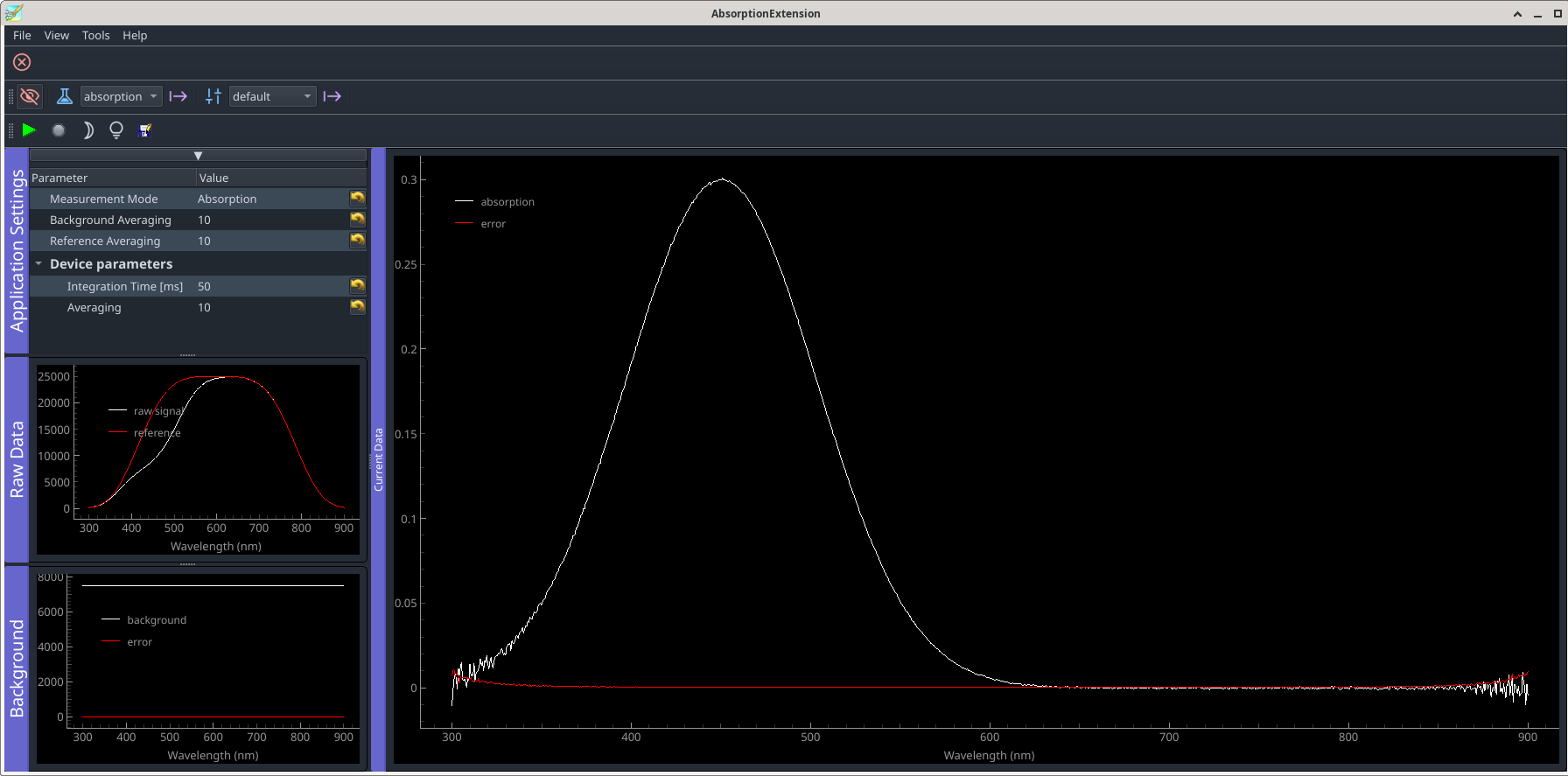
Running the extension in absorption mode should lead to a result like shown below.
-> branch csv-export
3.6.8.1. Resumé and outlook
At this point we have an extension which is controlling an absorption measurement, based on simulation plugins which–thanks to PyMoDAQ’s modular design–can easily be exchanged with plugins controlling real devices. However, the link between the functionality of the dashboard and the extension is still hard coded. At the present state, the extension expects the spectro-photometer and the shutters to be defined in the experiment configuration with the literal names coded into the extension. The same holds for the retrieval of the spectro-photometer’s data in DataToExport object received from the plugin.
Addressing this issue asks for implementing some sort of configuration dialog which exposes a list of suitable acquisition devices and actuators and permits to probe the content of the data exported by the plugin. This will be handled in a further chapter, after two interludes on a custom application–which uses the hardcoded approach even without a dashboard being present–and how the flipping back and forth between different states of measurement–background, reference and absorption–can be acomplished using the state manager, thereby reducing the amount of code to be written.