3.6.4. Spectro-Photometer plugin
The next step on our journey is to implement a viewer plugin as an interface between PyMoDAQ and our spectrometer. To this end, the template file daq_1Dviewer_Template.py in src/pymodaq_plugins_tutorial_extension/daq_viewer_plugins/plugins_1D has to be renamed according to PyMoDAQ’s naming convention for plugins. We’ll call the device MockSpectro. The file has therefore to be renamed to daq_1Dviewer_MockSpectro.py.
The template file contains extensive information as comments which are to be replaced by the corresponding real code.
Inside the plugin file, a single class MockSpectro implements the interface to PyMoDAQ. Watch out for the naming convention and lower case vs upper case. File name and class name have to match in a specific manner.
import numpy as np
from pymodaq.utils.data import DataFromPlugins, Axis, DataToExport
from pymodaq.control_modules.viewer_utility_classes import DAQ_Viewer_base, \
    comon_parameters, main
from pymodaq.utils.parameter import Parameter
from pymodaq_plugins_tutorial_extension.hardware.controller import \
    MockSpectrograph


class DAQ_1DViewer_MockSpectro(DAQ_Viewer_base):
    """Simulated Spectrometer Instrument plugin class for a 1D viewer.

    Besides testing spectrometer applications, this plugin permits to
    simulate real detectors with realistic noise settings.
    """
The parameters defined in the controller have to be repeated here to export them to PyMoDAQ together with the necessary information.
params = comon_parameters+[
    {'title': 'Integration time [sec]', 'name': 'integration_time',
     'type': 'float', 'min': 0.001, 'value': 1,
     'tip': 'Integration time in seconds' },
    {'title': 'Number of pixels', 'name': 'n_pixels', 'type': 'int',
     'min': 1, 'value': 500 },
    {'title': 'Wavelengths from:', 'name': 'wl_from',
     'type': 'float', 'min': 250, 'max': 450, 'value': 300 },
    {'title': 'Wavelengths to:', 'name': 'wl_to',
     'type': 'float', 'min': 450, 'max': 1500, 'value': 900 },
    {'title': 'Readout noise [LSB]', 'name': 'readout_noise',
     'type': 'float', 'min': 0, 'value': 4,
     'tip': 'Acquisition noise in LSB' },
    {'title': 'Dark level [LSB/µs]:', 'name': 'dark_level',
     'type': 'float', 'min': 0, 'value': 2e3,
     'tip': 'Dark signal per second in LSB' },
    {'title': 'Light level [LSB]', 'name': 'light_level',
     'type': 'float', 'min': 0, 'value': 32e3,
     'tip': 'Signal per second in LSB' },
    {'title': 'Conversion [PE/LSB]', 'name': 'pe_per_lsb',
     'type': 'float', 'min': 1, 'value': 18.3,
     'tip': 'Photo electrons per LSB' },
    {'title': 'ADC bits', 'name': 'adc_bits',
     'type': 'int', 'min': 10, 'max': 32, 'value': 16,
     'tip': 'Number of ADC bits' },
    {'title': 'Absorption:', 'name': 'absorption',
     'type': 'float', 'min': 0, 'value': 0.3,
     'tip': 'Simulated optical density' },
]

parameter_names = [param['name'] for param in params]
The last line serves as abbreviation when handling parameter changes. The initialisation of these parameters is done in the controller in the present case. We’ll just tell any editing program of which type the controller should be and place a mark that the spectrometer’s x-axis has yet to be determined, once the controller is up and running.
def ini_attributes(self):
    self.controller: MockSpectrograph = None
    self.x_axis: Axis = None

def commit_settings(self, param: Parameter):
    if param.name() in self.parameter_names:
        setattr(self.controller, param.name(), param.value())
Changed parameter values can directly be handed over to the controller. There’s no need for any manipulation on our simulated device.
The initialisation of the controller has to respect a speciality of PyMoDAQ. Any plugin can be either a master which owns a controller instance or a slave which shares the controller with another plugin with master role.
 def ini_detector(self, controller=None):
    """Detector communication initialization

    Parameters
    ----------
    controller: (object)
        custom object of a PyMoDAQ plugin (Slave case). None if only
        one actuator/detector by controller
        (Master case)

    Returns
    -------
    info: str
    initialized: bool
        False if initialization failed otherwise True
    """

    self.ini_detector_init(slave_controller=controller)

    if self.is_master:
        self.controller = MockSpectrograph()
        self.x_axis = Axis(label='Wavelength', units='nm',
                            data=self.controller.wavelengths, index=0)

    return "MockSpectro initialised", True

def close(self):
    """Terminate the communication protocol"""
    pass
For sake of simplicity we assume here that the controller has a property called wavelength, being a 1D numpy array with a wavelength value per pixel. In case we’re programming the controller ourselves we can make sure that such property is indeed present. Should the controller be provided by the device’s supplier, one may either add the property by modifying the supplied code or use here whatever means the controller provides to obtain the spectrometer’s wavelength or energy axis. We may also opt to export the wavelength axis together with the recorded data. That basically depends on whether the wavelength or energy scale can be changed.
Obtaining the simulated spectroscopic data is a matter of calling the corresponding method on the controller.
That data is wrapped in DataFromPlugins and DataToExport so that the viewer object can determine what to do with and how to display it.
    def grab_data(self, Naverage=1, **kwargs):
        """Start grabbing from the detector
        Use a synchrone acquisition (blocking function)

        Parameters
        ----------
        Naverage: int
            Number of hardware averaging.
        """

        spectrum, time_stamp = self.controller.grab_spectrum()

        dfp_spectrum = \
            DataFromPlugins(name='MockSpectro', data=[spectrum], dim='Data1D',
                            labels=['spectrum'], axes=[self.x_axis])
        dfp_time_stamp = \
            DataFromPlugins(name='TimeStamp', data=[np.array([time_stamp])],
                            dim='Data0D', labels=['time stamp'])

        self.dte_signal.emit(DataToExport(name='spectrum',
                                          data=[dfp_spectrum, dfp_time_stamp]))

    def stop(self):
        """Stop the current grab hardware wise if necessary"""
        pass

if __name__ == '__main__':
    main(__file__)
The method needs a counter part in the controller
 class MockSpectrograph:
 ...
     def __post_init__(self):
         self.with_sample = True
         self.calculate_base_data()
 ...
     def grab_spectrum(self):
         time.sleep(max(self.integration_time * 1e-6, 0.001))
         return self.simulate_spectrum(True, self.with_sample)
This code can be tested by directly running the plugin script as
$ python daq_1Dviewer_MockSpectro.py
A bare plugin window should open
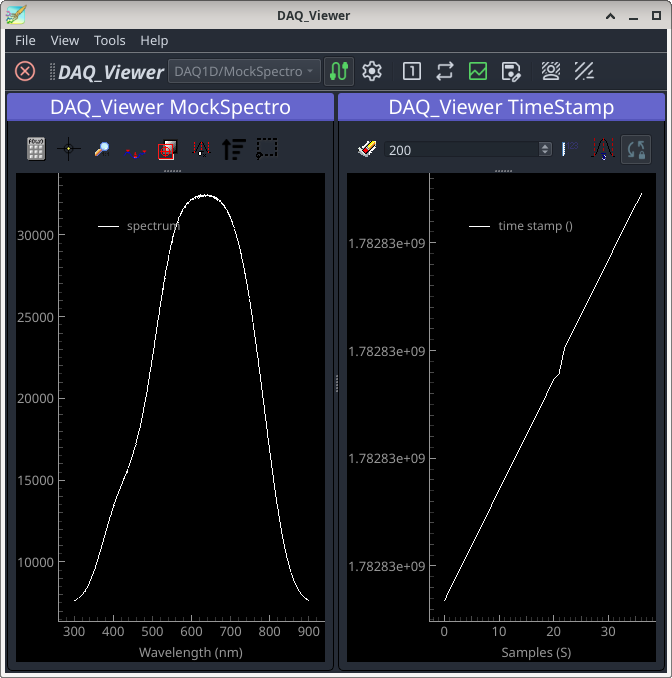
and should display simulated data when pressing the grab button (the left-right arrows in the tool bar). A few debugging hints in case that this does not happen:
Double check the naming of the plugin classes for upper and lower case.
Insert a breakpoint in the plugin’s
ini_stageorini_detectormethod and execute the code step by step to catch the line where the initialisation fails.If the plugin doesn’t event get to execute that method or crashes when clicking the connect icon, check the log file for error messages (
~/.pymodaq/log/pymodaq.log).
-> branch spectro-plugin